The Best AI Receptionist Tools in 2026: 12 Honest Reviews
- We’re one of the tools in this list. Ignitvio is an AI receptionist for service businesses, and we’d be lying by omission if we didn’t include ourselves. Our methodology is below, we did not rank ourselves #1 overall.
- No single tool wins for every business. The right AI receptionist depends entirely on your use case, solo operator, multi-location service business, legal practice, dental office, enterprise call center.
- Pricing models vary by 10×. Per-minute, per-call, flat-rate, and per-seat models all exist. The same call volume can cost $100/month or $2,000/month depending on which model you pick.
- AI vs. human matters less than you’d think. The bigger split is between integrated platforms (call + text + booking + CRM) and single-channel tools (call-only or text-only). Service businesses almost always need integrated.
- Six use-case winners at the end of this guide, including categories where competitors beat us.
What Is an AI Receptionist (and How Is It Different From an Answering Service)?
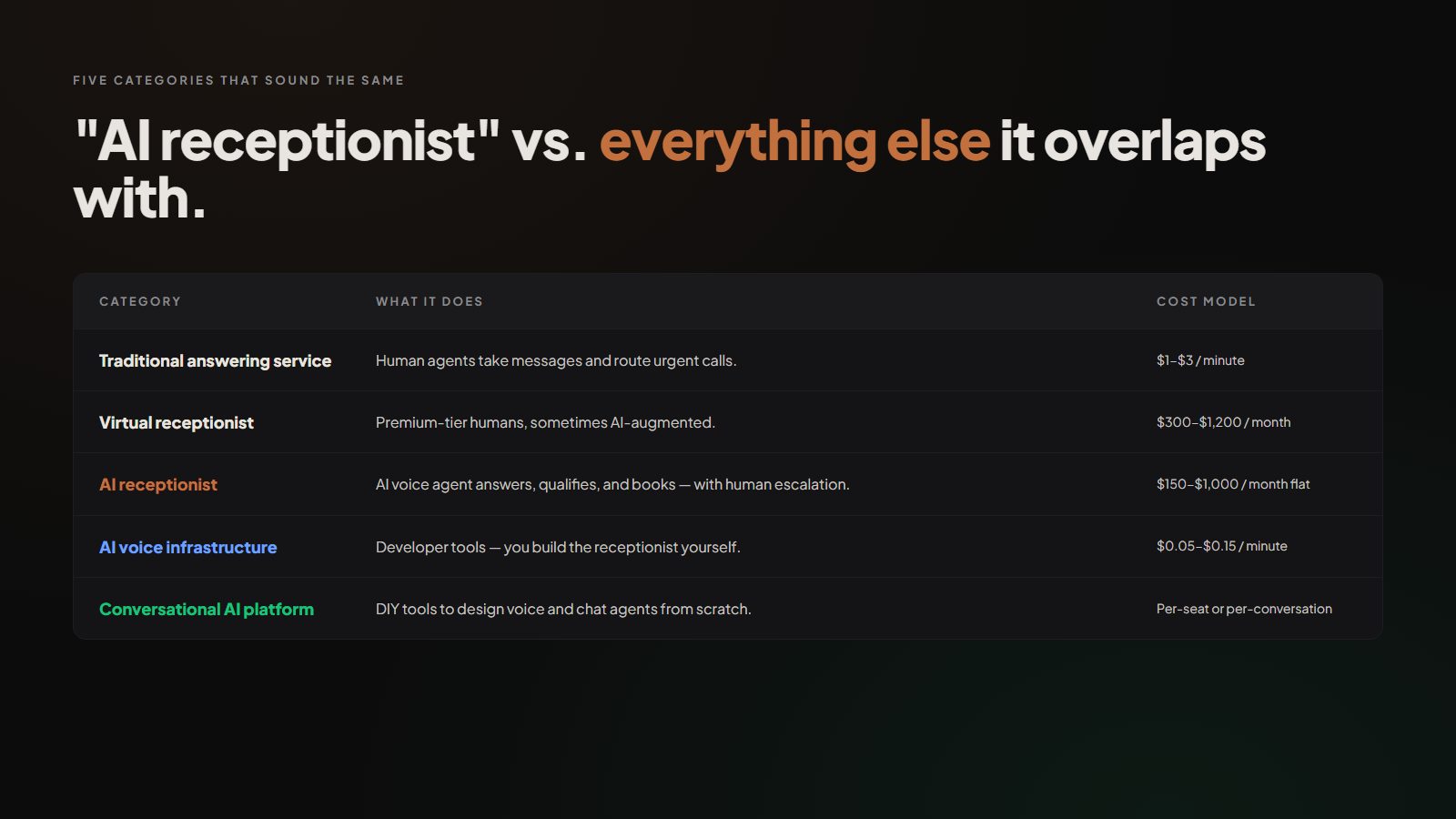
An AI receptionist is software that answers your inbound calls, and increasingly your texts, web chats, and form submissions, in a natural-sounding voice, qualifies the caller, and either books the appointment directly or routes to a human when needed. The category overlaps with several adjacent categories that are sometimes used interchangeably but mean different things:
| Category | What it does | Cost model |
|---|---|---|
| Traditional answering service | Human agents answer in your business name, take messages, route urgent calls | Per-minute or per-call ($1-$3/min typical) |
| Virtual receptionist | Same as above but often premium-tier humans, sometimes AI-augmented | Tiered monthly minutes ($300-$1,200/mo) |
| AI receptionist | AI voice agent answers, qualifies, books, usually with human escalation | Flat monthly fee ($150-$1,000/mo) |
| AI voice infrastructure | Developer tools for building your own AI voice agents | Per-minute usage ($0.05-$0.15/min) |
| Conversational AI platform | DIY tools to design voice and chat agents | Per-seat or per-conversation |
The lines have blurred over the past two years. Smith.ai started as a human virtual receptionist and now offers AI; Ruby Receptionists stayed human-premium; pure-AI vendors like Posh, Numa, and Goodcall built directly for the AI category. Each path produced a different product.
For most service businesses asking “which AI receptionist should I pick,” the question is really five questions in a trench coat. Before picking a tool, work through the six dimensions below.
The 6 Dimensions That Actually Matter When Evaluating an AI Receptionist
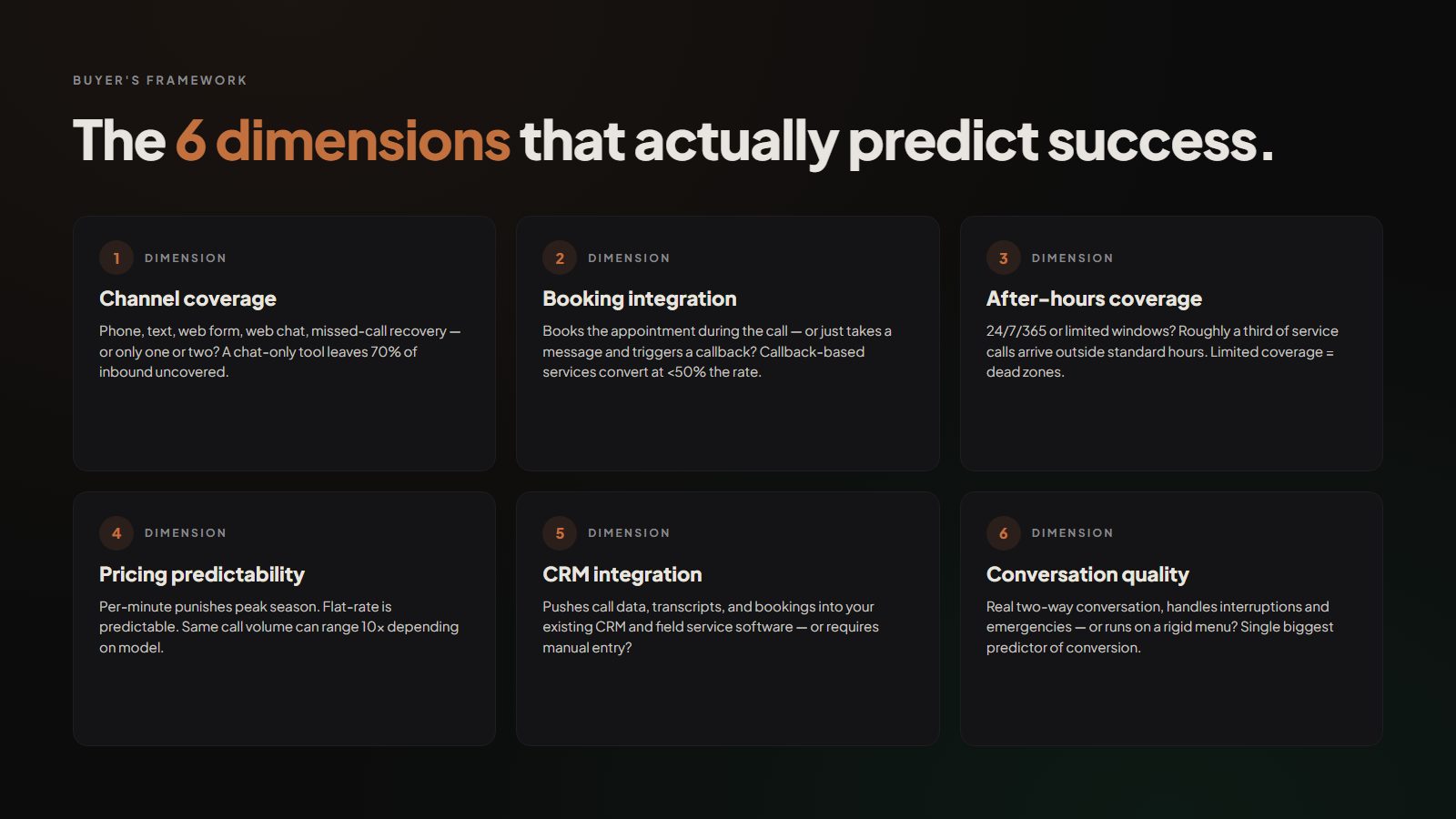
Most “best of” articles compare AI receptionists on whatever spec sheet the vendor publishes. That’s the wrong frame. The dimensions that actually predict whether a tool succeeds for you are:
1. Channel coverage
Does the tool cover phone, text, web form, web chat, and missed-call recovery, or only one or two? Phone is still the dominant channel for most service businesses. A chat-only tool leaves 70% of your inbound volume uncovered.
2. Booking integration
Can the tool actually book an appointment to your real calendar during the call, or does it only take a message and trigger a callback? CallRail data shows callback-based services convert at less than half the rate of in-call booking.
3. After-hours and weekend coverage
Is the tool 24/7/365 or only during paid coverage windows? Roughly a third of service-business calls arrive outside standard hours. Tools with limited coverage create dead zones. See how a 24-hour virtual receptionist handles emergency calls. The gap between booking-on-the-call and message-taking is the entire ROI difference.
4. Pricing model and predictability
Per-minute pricing is predictable when call volume is steady, and brutal when call volume spikes (storm season, summer HVAC, busy season). Flat-rate pricing is more predictable but often ceilings out at certain volumes.
5. CRM and software integration
Does the tool push call data, transcripts, and booking info into your existing CRM, field service software, or calendar, or do you have to copy data manually? A standalone tool that doesn’t integrate is a leak waiting to happen.
6. Voice/conversation quality and qualification depth
Can the AI hold a real two-way conversation, handle interruptions, qualify emergency vs. non-emergency calls, and answer basic pricing questions, or does it run on a rigid menu? HubSpot research consistently shows that conversation quality is the single biggest predictor of caller-to-customer conversion.
If you score every tool you’re evaluating against these six dimensions, the shortlist usually narrows itself to two or three, and the “right” answer almost always depends on which dimension matters most to your specific business.
Pricing Models: Why the Same Call Volume Costs $100 or $2,000 Per Month
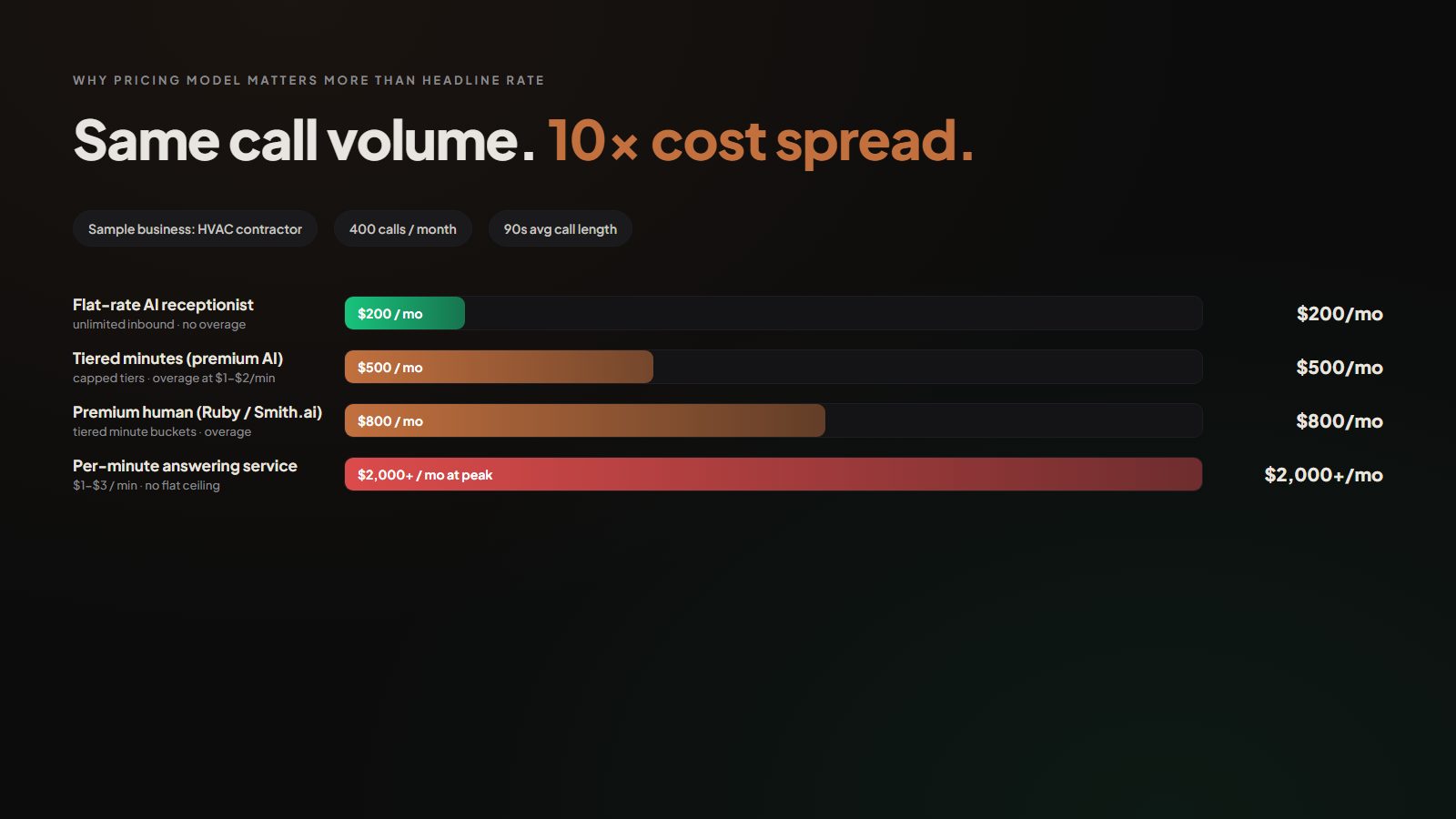
The single biggest source of confusion in AI receptionist pricing is that vendors quote different unit economics. The same business, say, an HVAC contractor with 400 inbound calls per month and average call length of 90 seconds, will pay wildly different prices depending on the model:
The same 400-call/month volume can range from roughly $200/month to over $2,000/month depending on which pricing model the vendor uses. Pricing model matters more than headline rate.
Source: Industry pricing analysis (2026)There are four pricing archetypes:
Per-minute / per-call
You pay for actual usage, typically $1-$3/minute or $5-$15/call. Predictable when call volume is steady. Brutally expensive in busy seasons. Most traditional answering services and several “AI-augmented human” services use this model.
Tiered minutes/calls
Buckets like “100 minutes / month” for $300, “300 minutes / month” for $600. Predictable up to a ceiling, then overage charges hit. Common in premium human services.
Flat-rate per business
A single monthly fee that includes unlimited or high-cap call volume. Most AI-only platforms use this model. Best for businesses with variable or growing volume.
Per-seat / per-user
More common in B2B chat and SDR tools, less common in service-business AI receptionists, but worth flagging.
For a service business with seasonal spikes, flat-rate is almost always the winning model unless your volume is extremely low and predictable. For a high-touch professional services firm with 30-40 calls/month, premium human at per-minute can pencil out fine.
How to Choose by Business Type
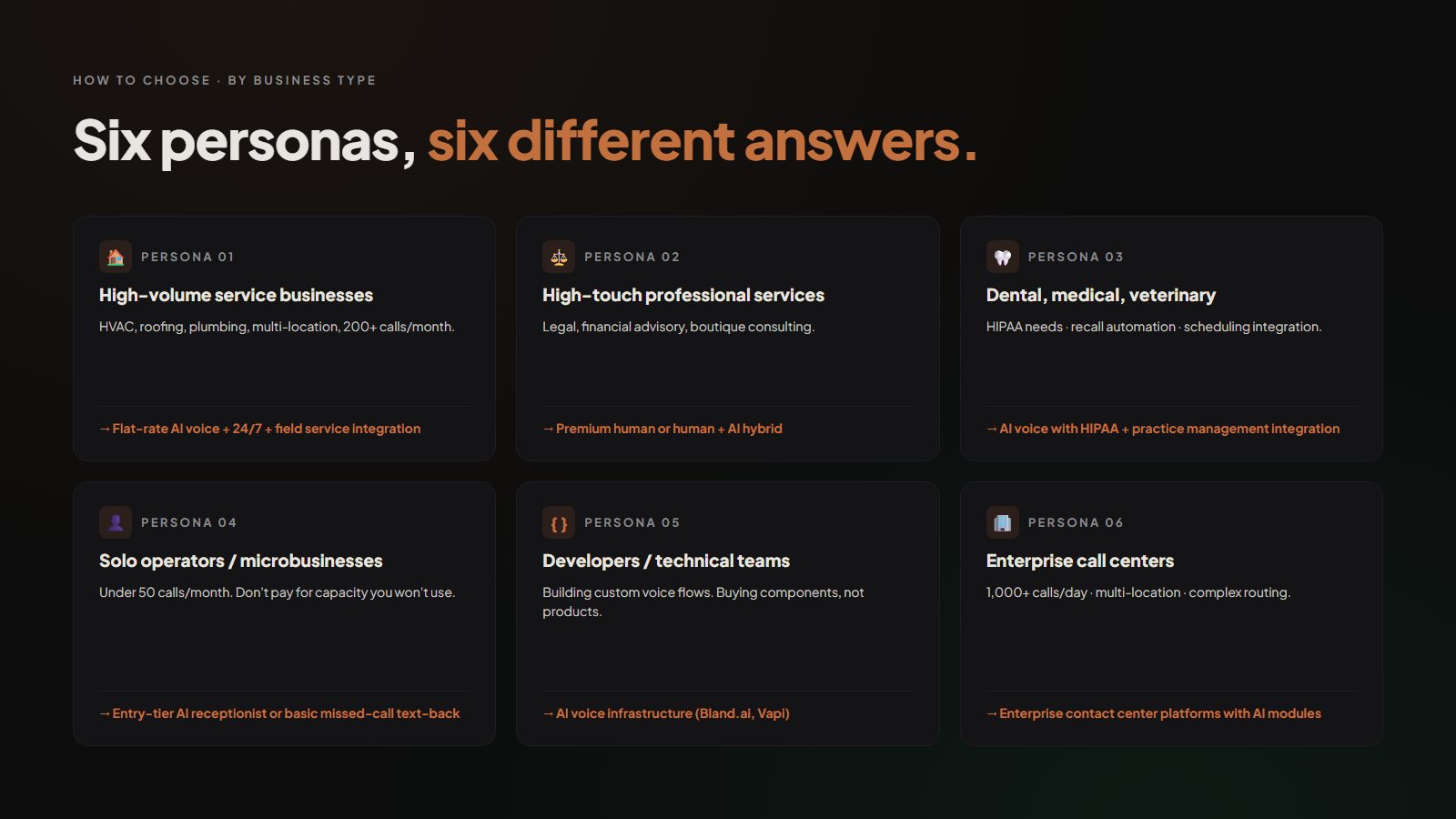
Before going to the actual list, it helps to narrow by use case. The 12 tools below cluster naturally into a handful of buckets, and the right answer for you is almost always determined first by what kind of business you run, then by feature/price.
For high-volume service businesses (HVAC, roofing, plumbing, multi-location, 200+ calls/month)
flat-rate AI voice with 24/7 coverage and field service software integration. Per-minute pricing kills the budget in busy seasons.
For high-touch professional services (legal, financial advisory, boutique consulting)
premium human or human + AI hybrid. The conversation quality matters more than cost; clients expect a real person.
For dental, medical, and veterinary practices
AI voice with HIPAA-compliant data handling, recall-call automation, and booking-system integration. Voice quality must be patient-grade.
For solo operators and microbusinesses (under 50 calls/month)
entry-tier AI receptionist or basic missed-call text-back. Don’t pay for capacity you won’t use.
For developers and technical teams building custom voice flows
AI voice infrastructure (Bland.ai, Vapi) or conversational AI platforms (Voiceflow). You’ll build it yourself; you’re not buying a finished product.
For enterprise call centers (1,000+ calls/day, multi-location, complex routing)
enterprise contact-center platforms, outside the scope of this list, with AI voice modules layered in.
Our Methodology for This List
We evaluated each tool against the six dimensions above, pulled current pricing from public vendor pages as of April 2026 (some vendors don’t list pricing publicly, flagged where applicable), and aggregated user-review signal from G2, Capterra, and Trustpilot.
A note on bias: Ignitvio is one of the tools in this list. We disclosed that at the top, and we did not rank ourselves #1 overall. We do win one specific use-case category (service businesses) where we have a strong track record. Other tools win other categories. We tried to write each entry the way we’d want a competitor to write us up, fair, specific, with real cons.
We also intentionally did not assign a “best overall.” There isn’t one. The best tool is the one that fits your specific use case.
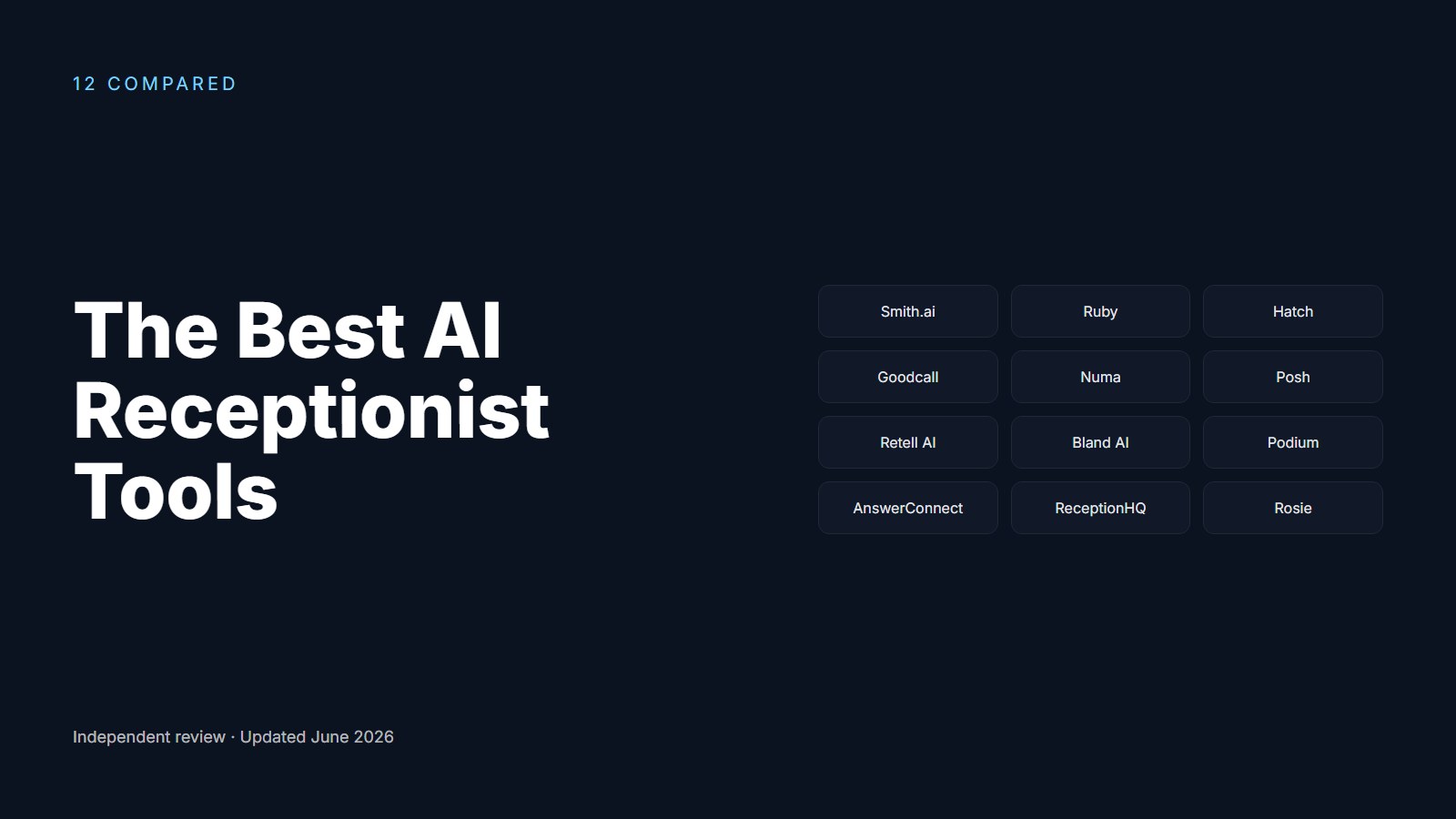
The 12 Best AI Receptionist Tools in 2026 (Alphabetical)
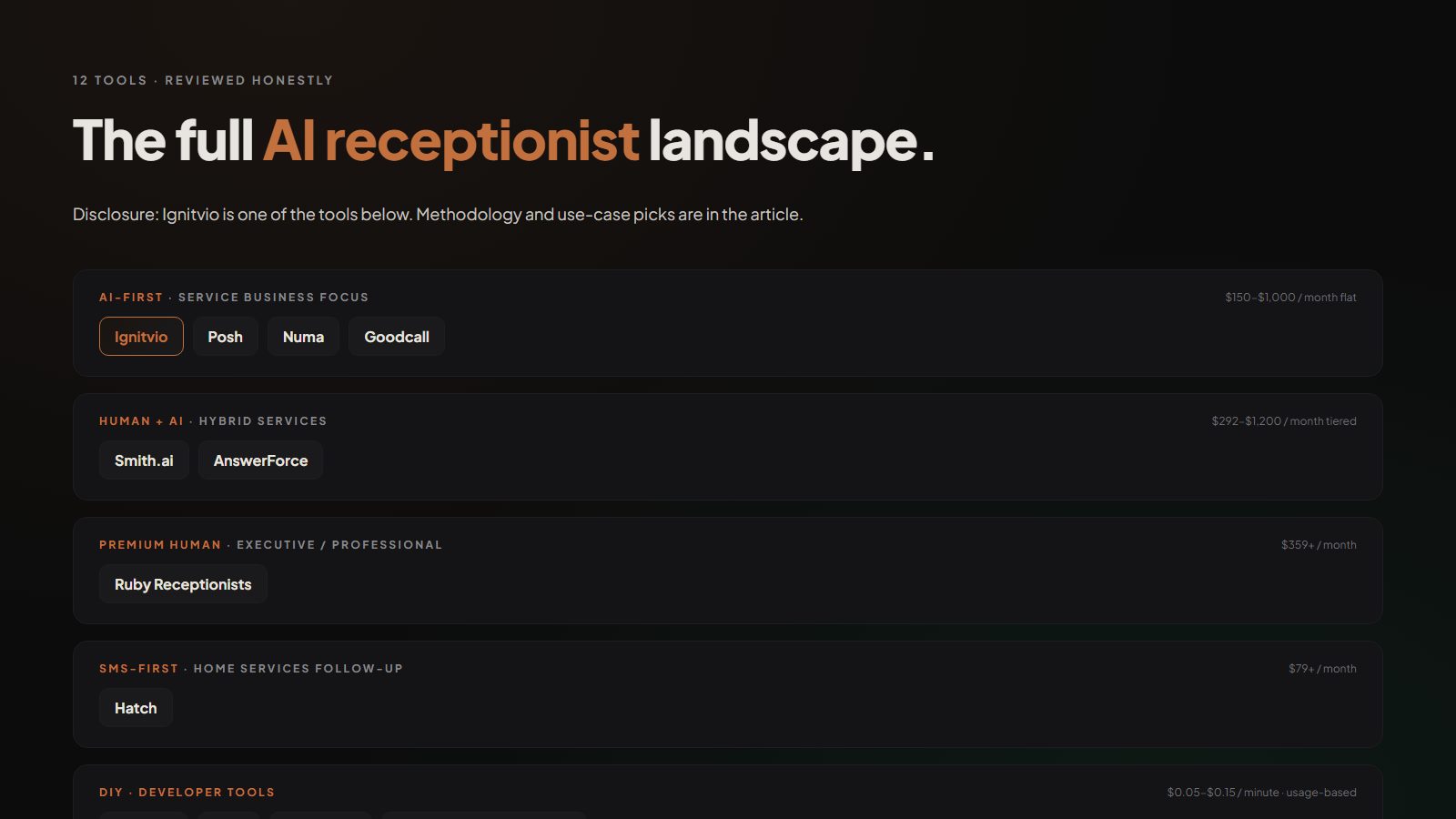
The 12 Tools at a Glance
- 1 Details
Best Legacy Human Service
AnswerForce
- 2 Details
Best Developer Voice Infrastructure
Bland.ai
- 3 Details
Best for Solo Operators
Goodcall
- 4 Details
Best for SMS-First Reactivation
Hatch
- 5 Details
Best for Service Businesses
Ignitvio
- 6 Details
Best Text-First Recovery for Trades
Numa
- 7 Details
Best Focused AI Voice for Home Services
Posh
- 8 Details
Best Premium Human Standard
Ruby Receptionists
- 9 Details
Best Human + AI Hybrid
Smith.ai
- 10 Details
Best Voice Infrastructure for Engineers
Vapi
- 11 Details
Best Conversational AI Builder
Voiceflow
- 12 Details
Best Single-Vendor Convenience
Generic CRM AI Add-ons
Best Legacy Human Service
AnswerForce
Type
Human + light AI
Pricing
From $279/mo for 100 minutes
Best for
Businesses wanting a human on every call
Why We Picked It
Traditional 24/7 human answering service with AI features layered in. Live receptionists answer in your business name, take messages, transfer urgent calls. Strong on industry-specific scripting (legal, medical, contracting).
Pros
- Live U.S.-based humans
- Established brand with long track record
- Good industry-specific scripting (legal, medical, contracting)
Cons
- Per-minute model gets expensive at volume
- Not a true AI booking solution
- Callbacks required for most appointments

Best Developer Voice Infrastructure
Bland.ai
Type
Developer voice infrastructure
Pricing
~$0.09/minute usage-based
Best for
Developers building custom AI voice products
Why We Picked It
AI voice infrastructure for developers. Not a finished receptionist product, it’s the underlying voice AI that other companies build their products on. Powerful for teams with engineers who want full control.
Pros
- Cutting-edge voice quality
- Full API control
- Transparent usage-based pricing
Cons
- Not a turnkey receptionist product
- You build the conversation flows yourself
- Integrations and dashboards are DIY

Best for Solo Operators and Microbusinesses
Goodcall
Type
AI receptionist, entry-tier
Pricing
From $19/mo for limited minutes
Best for
Solo professionals and microbusinesses
Why We Picked It
AI receptionist designed for solo operators and small offices. Strong out-of-the-box flows, simple onboarding, easy pricing.
Pros
- Easy to set up
- Most affordable AI tier in this list
- Decent voice quality for the price point
Cons
- Limited integrations
- Not built for high-volume service-business workflows
- Basic qualification depth

Best for SMS-First Lead Reactivation
Hatch
Type
Two-way SMS + emerging AI
Pricing
From $79/mo, scales by team
Best for
Home improvement, outbound text follow-up
Why We Picked It
Originally a two-way SMS platform for home services, now expanding into AI agents for follow-up and reactivation. Very strong at outbound texting and “speed to lead” messaging.
Pros
- Best-in-class SMS automation
- Mature follow-up and reactivation workflows
- Strong integrations with home services CRMs
Cons
- Not phone-call-first
- Inbound calls still need a separate solution
- Limited true AI voice capability

Best for Service Businesses
Ignitvio
Type
AI voice + text + follow-up
Pricing
Flat-rate monthly, priced by module
Best for
HVAC, roofing, plumbing, dental, property mgmt
Why We Picked It
(That’s us. Honest write-up.) AI voice + missed-call text-back + automated follow-up, built specifically for service businesses with high inbound call volume and after-hours demand. Fully integrated platform: phone, text, form, booking, and follow-up on a single stack.
Pros
- Sub-30-second response on every channel
- Books to calendar during the call
- Flat-rate pricing predictable at any volume
- Deep integrations with field service software
Cons
- Newer brand, smaller user community than legacy players
- Built for service businesses, not legal or B2B SaaS
- Multi-language support narrower than Smith.ai or Ruby

Best Text-First Recovery for Trades
Numa
Type
AI text + voice for trades
Pricing
Custom, typically $200-$500/mo
Best for
SMB service businesses focused on text recovery
Why We Picked It
AI text + voice for trades and small businesses. Strong on missed-call text-back and after-hours capture. Decent voice agent capabilities.
Pros
- Strong missed-call text-back recovery
- Friendly UX for non-technical owners
- Good integrations with trades CRMs
Cons
- Voice agent depth shallower than purpose-built voice tools
- Pricing not transparent on the public site
Best Focused AI Voice for Home Services
Posh
Type
AI voice receptionist
Pricing
Typically $200-$500/mo tier-based
Best for
Service businesses wanting a focused voice agent
Why We Picked It
AI receptionist for service businesses. Direct competitor in the AI voice category, focused on call answering, qualification, and appointment booking.
Pros
- Mature voice quality
- Established in the home services category
- Decent dispatch integrations
Cons
- Narrower channel coverage than full platforms
- Pricing transparency varies
Best Premium Human Standard
Ruby Receptionists
Type
Premium human
Pricing
From $359/mo for 100 minutes
Best for
High-touch professional services
Why We Picked It
The premium human receptionist standard. Live U.S.-based receptionists, deep call handling, very high quality. AI features are secondary; Ruby’s core promise is the human voice.
Pros
- Best-in-class human conversation quality
- Strong industry-specific training
- Great brand reputation across 20+ years
Cons
- Premium pricing scales fast at volume
- Not built for high-volume service work
- AI features are a recent add, not core

Best Human + AI Hybrid
Smith.ai
Type
Human + AI hybrid
Pricing
From $292/mo for 30 calls
Best for
Legal, financial, professional services
Why We Picked It
Hybrid human + AI virtual receptionist. Has been in the category for years and built one of the most sophisticated human-AI handoff workflows. Strong in legal and professional services.
Pros
- Excellent human + AI handoff workflow
- Deep legal-industry features
- Strong CRM integrations (Clio, HubSpot, Salesforce)
Cons
- Per-call pricing expensive for high-volume businesses
- AI-only mode is less mature than the human side
Best Voice Infrastructure for Engineers
Vapi
Type
Developer voice infrastructure
Pricing
$0.05-$0.15/minute, usage-based
Best for
Engineering teams building custom voice agents
Why We Picked It
AI voice infrastructure (similar to Bland.ai). Developer-focused. Very fast voice models, good documentation, growing fast in the developer community.
Pros
- Excellent voice quality
- Fast response time
- Strong developer experience and docs
Cons
- Not a finished product
- You build the agent yourself

Best Conversational AI Builder
Voiceflow
Type
Conversational AI design platform
Pricing
From $50/mo individual; enterprise tiers
Best for
Internal teams building bespoke conversation flows
Why We Picked It
Conversational AI platform, a DIY tool for designing voice and chat agents visually. Used by larger companies building bespoke conversational experiences.
Pros
- Powerful visual design tooling
- Strong testing and QA features
- Good for complex conversational logic
Cons
- Not a receptionist out-of-the-box
- You're buying a builder, not a finished product
Best Single-Vendor Convenience
Generic CRM AI Add-ons
Type
Bundled CRM add-on
Pricing
$50-$300/mo additional
Best for
Businesses deeply embedded in one CRM
Why We Picked It
Several CRMs (HubSpot, Salesforce, Housecall Pro, ServiceTitan) now ship “AI receptionist” features as bundled add-ons. Quality and depth vary widely.
Pros
- Single-vendor simplicity
- Native CRM integration out of the box
Cons
- Voice and qualification depth lag dedicated AI tools by 1-2 years
- Treated as a bolt-on, not a core product
Best AI Receptionist by Use Case
Full disclosure: Ignitvio is our company. We built one of the tools in this guide and gave it a use-case win below. We’ve worked hard to write each entry fairly with real cons (including our own), but the section that picks Ignitvio is biased by design. Weigh the other categories on the criteria that matter for your business.
If you skipped here from the top, this is the winner-by-category cut. Each pick reflects the dominant use case the tool was built for, not an “overall winner.”
| Category | Winner | Why |
|---|---|---|
| Best AI receptionist for service businesses (HVAC, roofing, plumbing) | Ignitvio | Built specifically for high-volume call-driven service work with 24/7 flat-rate pricing and field service software integrations. |
| Best human + AI hybrid (legal, financial, professional services) | Smith.ai | The hybrid model is most mature here; legal-industry features and per-call pricing fit professional services well. |
| Best premium human-only (high-touch executive, boutique) | Ruby Receptionists | When the brief is “must sound like a human, every time,” nothing matches Ruby’s training and call quality. |
| Best for solo operators / microbusinesses | Goodcall | Lowest-friction onboarding and pricing for businesses with under 50 calls/month. |
| Best for SMS-first lead reactivation | Hatch | The two-way SMS workflows are the most mature in the category. |
| Best DIY / developer-focused | Bland.ai or Vapi | Both are excellent for engineering teams building custom AI voice agents from scratch. |
The honest takeaway: AI receptionists are not a one-tool category, and any vendor (including us) telling you they’re “best for everyone” is overselling. Match the tool to the job.
See how Ignitvio handles a real call
If you're a service business doing 100+ calls a month with after-hours volume, we'll show you exactly how AI voice + text-back + follow-up work together.
Book a 15-Minute DemoFrequently Asked Questions
Is an AI receptionist actually as good as a human?
How much does a typical AI receptionist cost?
Can an AI receptionist book to my existing calendar?
What happens if the AI doesn't understand the caller?
Is an AI receptionist HIPAA-compliant for medical and dental practices?
How long does it take to get an AI receptionist live?
Find out which AI receptionist fits your business
We'll show you what your current speed-to-lead is, what an AI receptionist would change, and whether Ignitvio is the right fit for your specific use case. No sales pressure.
Run the Free Revenue Audit
Jake Melendy
Founder, Ignitvio
Jake Melendy is the founder of Ignitvio. He spent 12 years in enterprise sales and sales leadership, including at Oracle, before building Ignitvio, which runs done-for-you outbound appointment setting for commercial contractors and B2B service companies. He writes about pipeline, trigger-based prospecting, and lead response.